Passing an approval to the right level: a new feature in three iterations
- TL;DR
- Product: a B2B service for business jet owners and operators. An invoice for a flight goes through up to five approval levels.
- Problem: an approver could hand a document to a colleague only as a whole, with all of their own rights. There was no way to put the colleague on a specific level, and the handed-over document stayed in the approver’s own queue.
- My role: Head of Design. Scenarios, the level rule and three iterations in code together with an AI agent. We went through the first one at a review; the customers who asked for the feature and their users tested the second and third on staging.
- Result: one rule for a single document and for a batch, and every “no” is explained in the dialog. Over five weeks of testing, 270 people were added to the approval of 63 documents. Both customers rated the third iteration positively: the key problem is solved, and the fixes from the test took one working day.
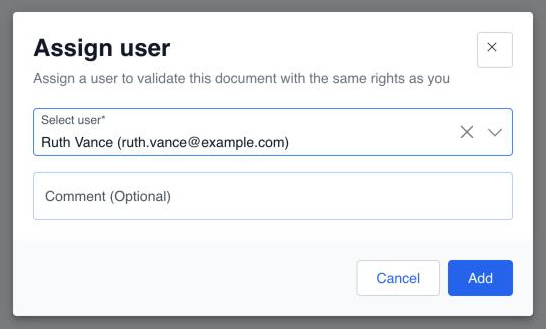
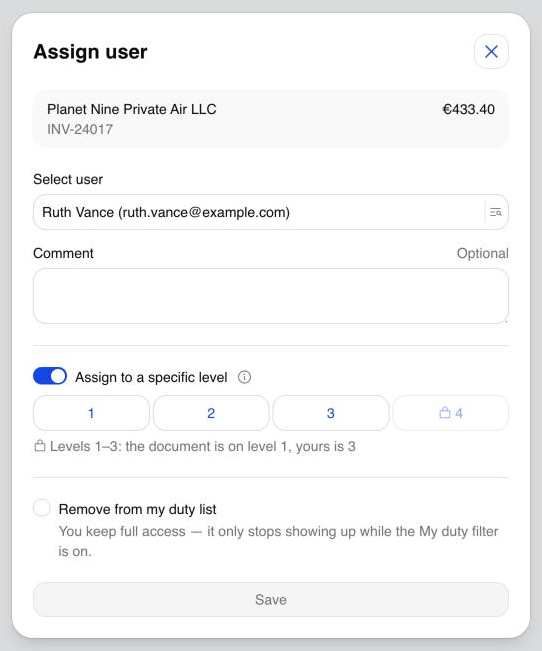
“After” is built on the new design system. The product was moving to it at the same time, so the dialog’s old fields look new too.
The problem
An invoice for a flight is approved along a chain: for example, the aircraft manager, then the director of operations, then finance. When an approver hands a document to a colleague, the colleague gets all of their rights and approves on their level. For finance this breaks the accounting: in the report, the approval sits on the wrong level under the wrong person.
“Levels 1 and 2 always belong to our operations team, and level 3 is finance only. We export the package of approved expenses to our accounting system, and for the audit every level in it has to show the right approver. Until that works, I’m keeping card expenses out of the export.”
The customers asked for two things:
- to put a colleague on a specific approval level;
- to take a handed-over document out of their own queue and keep access to it.
The hard part is the batch. Its documents sit on different levels, and the approver has a different level in each. The dialog has to offer only what can be handed over in every document at once, and explain why there is nothing to hand over when that happens.
Flow: one document
Four steps of the main path. Past the dashed line are the branches where the path turns off after step 2. The strip scrolls sideways, and the screenshots open at full size.
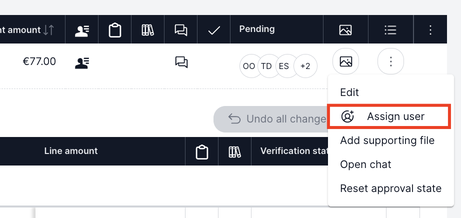
Open the document menu
In the document row, ⋮ → “Assign user”.
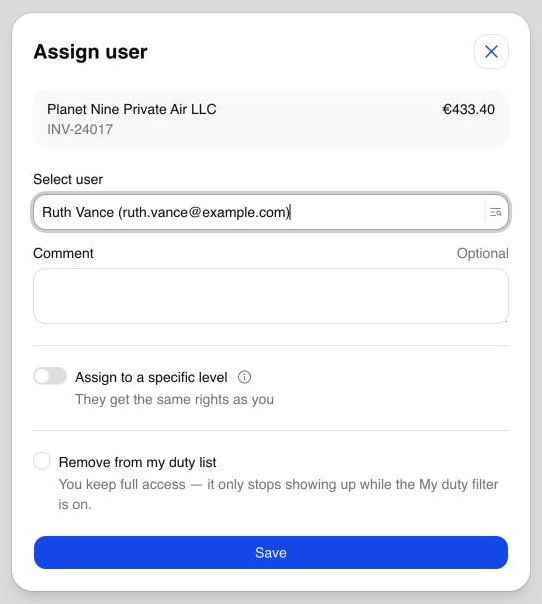
Pick a colleague
The document is at the top. Level is off: the colleague gets the same rights as you.
Turn on and pick a level
Only the available levels are open, the rest have a lock. The caption explains the range.
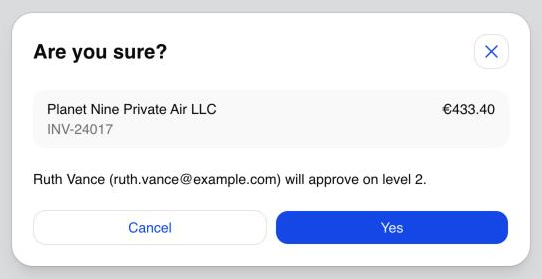
Confirm
The dialog names the colleague and the level in words.
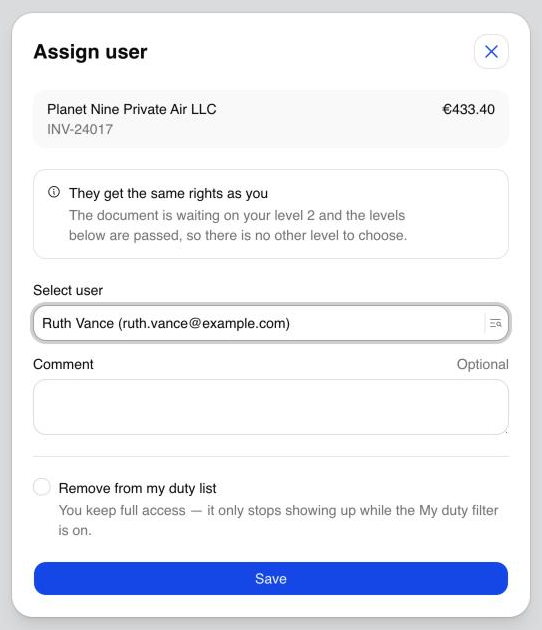
The document is waiting on your level info
There is nothing to choose: an explanation replaces the switch, and you save with the same rights.
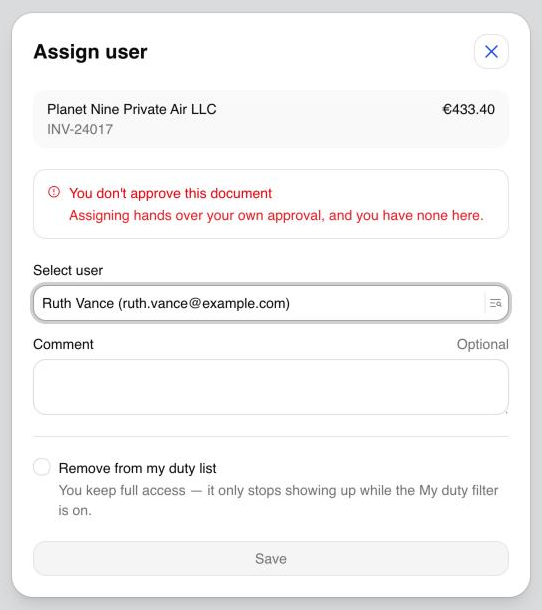
You don’t approve this document error
The path ends here: a red message at the top, and “Save” is disabled.
Flow: a batch of documents
The same path, but levels are counted across all documents at once. Past the dashed line are three branches. The first one is where the fixes of the third iteration started.
Select documents
Documents are checked in the list, and “Assign user” is in the action bar.
Pick a colleague
The summary block lists the document numbers. Level is off: the colleague approves each document where you do.
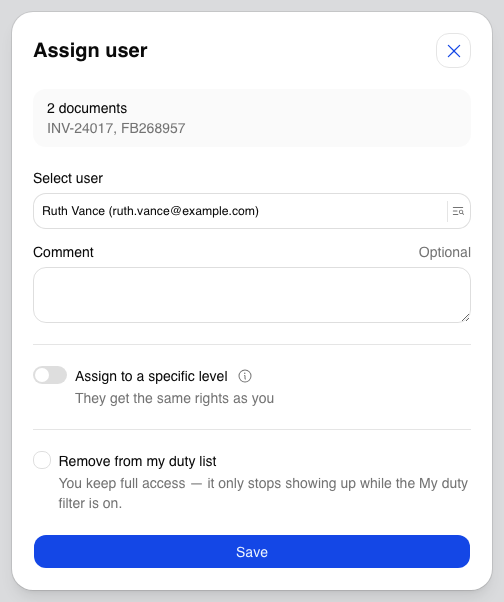
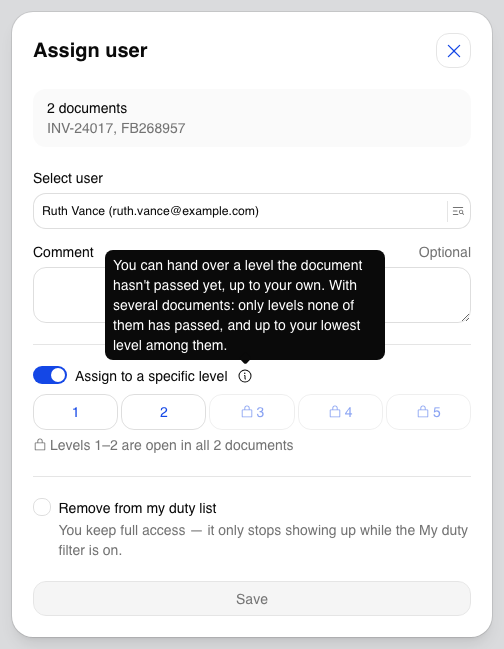
Turn on and pick a level
The levels both documents share are open: 1–2. The ⓘ tooltip explains the rule.
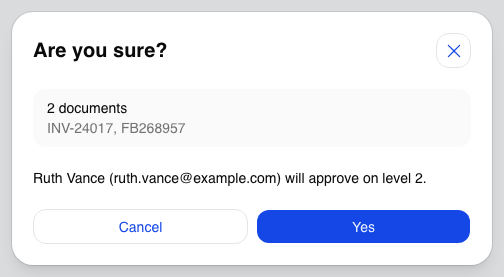
Confirm
One request for all documents. The dialog names the colleague and the level in words.
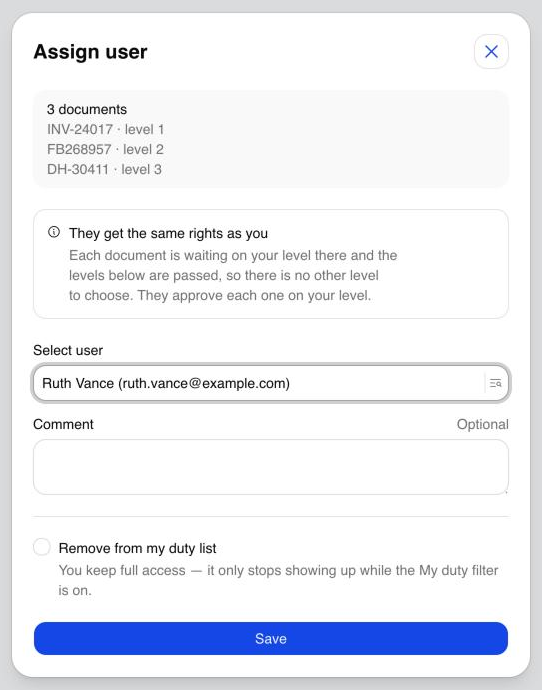
The documents wait for you on different levels info
The documents are on levels 1, 2 and 3. There is nothing to choose: the colleague approves each one where you do, and the summary block shows the levels.
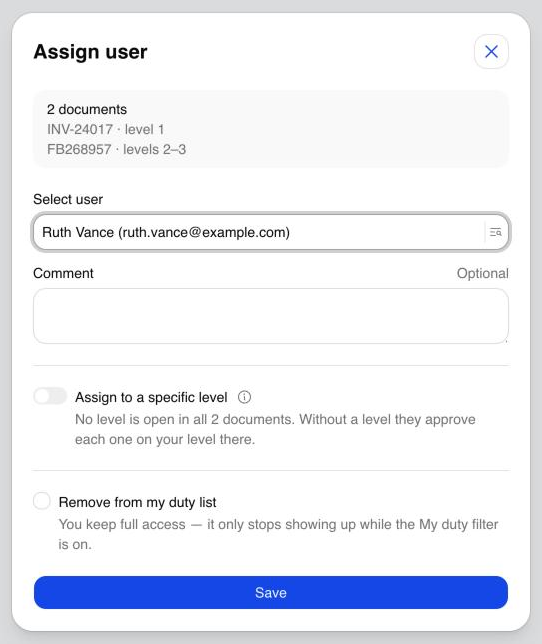
No shared level
The open levels of the documents don’t overlap. The switch is disabled, and under it are the reason and what happens without a level.
Some documents without access error
The dialog names these documents, and “Save” is disabled: they have to come off the selection.
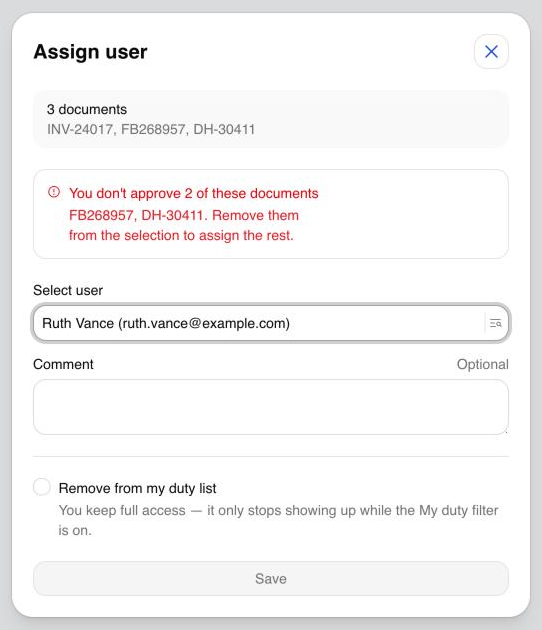
Iterations and the test
Iteration 1 · review
Two concepts in code: levels 1–5 in the dialog, and dragging people between levels in a panel. At the review we dropped the dragging and kept the dialog.
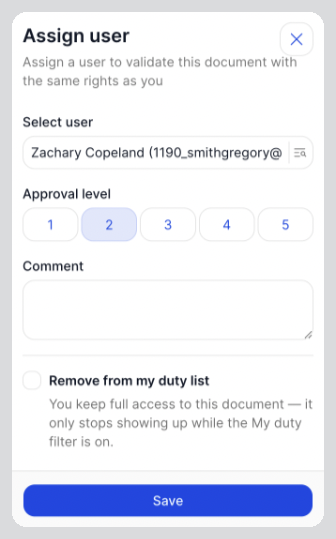
Iteration 2 · staging
The level is optional, capped at your lowest level, and the batch shows the document numbers.
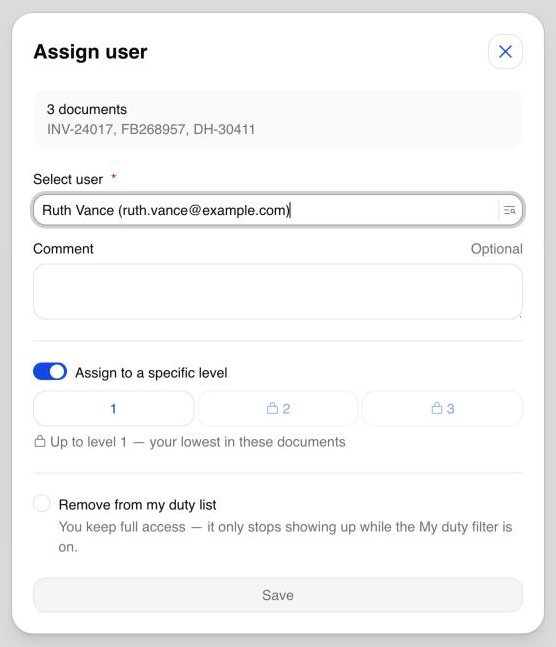
Five weeks on staging
The customers who asked for the feature and their users tried the dialog on their own documents, and we collected questions. Development was busy at the time, so the task waited three sprints.
Iteration 3 · staging
Fixes from the feedback in one working day. Both customers rated the iteration positively.
A batch of three documents, with available levels 1, 2 and 3. Nothing can be chosen, and the person doesn’t understand why. The suggestion was a warning: “no shared levels, go into each document separately”.
The default way out is your own rights: the colleague approves each document on your level. The summary block shows the level next to each document. The advice to go into each document stayed as a fallback.
Where do we say there is no shared level: in a pop-up message or in the dialog?
In the dialog, under the switch: the reason and what happens without a level. The person sees it before sending, right next to what they are choosing.
If the batch had a document you had no access to, the server rejected the whole request, and the error only showed up after “Save”.
The dialog names these documents in red up front, and “Save” is disabled. You take them off the selection and assign the rest.
Working through the first case, we found a deeper cause: the cap was based on your level and ignored where the document was. The dialog offered levels the document had already passed.
The rule now goes by where the document is: open from its level up to yours. Passed levels are locked both for one document and in a batch.
You can hand over a level the document hasn’t passed yet, and no higher than yours
The third iteration brought everything down to one rule for one document and for a batch. Each document has the level it is on now, and your level in it. Everything between them, both included, is open to hand over. Below are the passed levels: there is nothing left to approve there. Above are other people’s levels: you can’t give them away because you don’t have them.
One document
you on 4
Levels 2–4 are open. The caption under them says just that: “Levels 2–4: the document is on level 2, yours is 4”.
A batch of documents
on 1, you on 4
on 2, you on 3
Only the levels open in every document: from the furthest-along document (2) up to your lowest level (3).
From the document’s level up to your level in it.
No higher than your lowest level among the documents, and no lower than the level of the furthest-along document.
The switch is off: the colleague gets your rights and approves each document where you do. This path is always there when you have access.
Decisions and what they are based on
A passed level is locked
The dialog checks where each document is and doesn’t let you assign a colleague where there is nothing left to approve.
Basisthe case of three documents on levels 1, 2 and 3 from the test
Every “no” is explained in words
When there is nothing to choose or you can’t save, the dialog says why and what to do, before you send.
BasisNielsen’s heuristics #1 and #9; a design-system rule
Your own rights by default
Without a level, the colleague approves each document where you do. In a batch with different levels, that is exactly the answer you need.
Basisnobody is going to recount levels across twenty documents by hand
Block the batch and name the documents
Documents without access aren’t skipped silently: the dialog names them in red, and the person takes them off the selection.
Basisthe server rejects the whole request with such a document; red passes AA, yellow doesn’t
How one designer did it
The company is moving its products to its own design system at the same time, and there isn’t enough development for small features. I built this one myself to test the process I’m setting up: the designer has access to the code and the whole context of the task, and an AI agent writes the code from the designer’s decisions.
Before the third iteration, the agent got the context back after the pause: it brought the branch up to date with main and set up staging again. I made the decisions; the agent wrote the rule with 15 scenarios and 28 UI tests. The automatic design-system review found issues in the new parts of the dialog, and I closed them the same day. Development and product got the branch, the tests and a page with scenarios for every state of the dialog.
Result
people added to approvals during the five-week test of the second iteration
documents they were added to
customers rated the third iteration positively: the key problem is solved
“This is what we needed: we put someone from the operations team on their level and don’t give them finance’s rights. And you can see right away why a level is locked.”
Next: the backend accepts the level and the “Remove from my duty list” flag, and then the release.
What I took away
Small features wait longest in the development queue. When a designer has access to the code, an iteration takes a day and can go straight to people on staging: the dragging was dropped at the first review, and the broken rule was found during the five weeks of testing. The decisions stay with me: which rule is right and what to tell a person when there is nothing to choose.